Gateway API Replaces Ingress: A Step-by-Step Migration Playbook

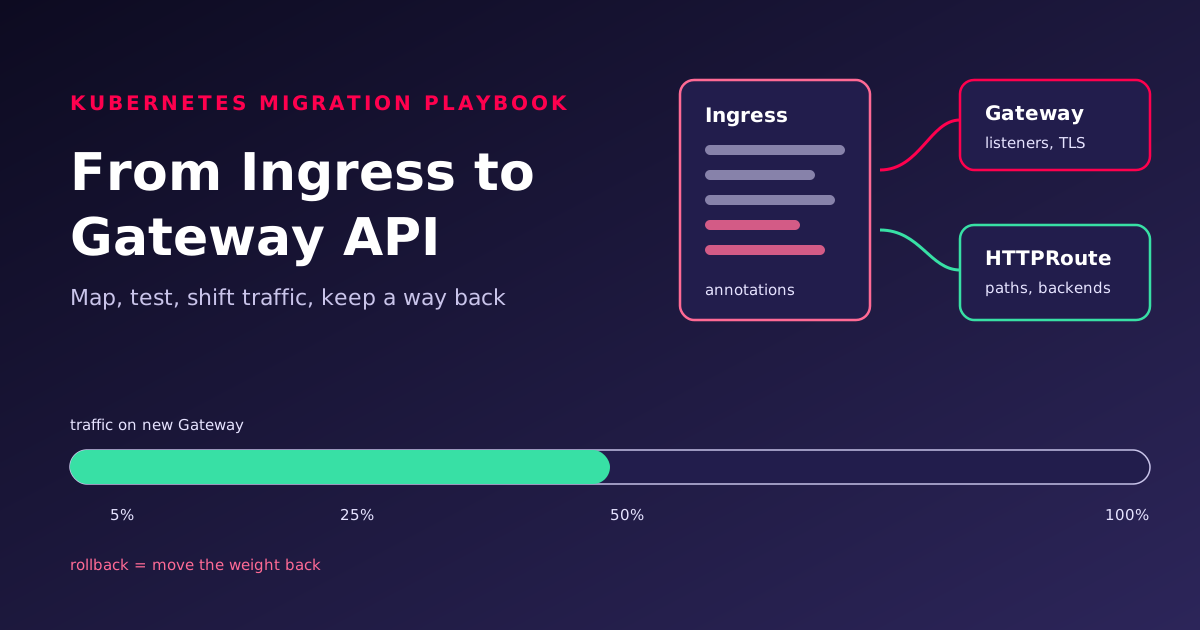
Ingress NGINX is retired and the Ingress API is frozen, so most Kubernetes teams now have a migration to plan. The YAML conversion is the easy part. Outages come from behaviour the old controller applied silently, and from cutovers with no tested way back. This playbook covers both, one service at a time.
This is the hands-on companion to Gateway API shifts cluster networking, which covers the platform design decisions (who owns the Gateway API CRDs, gateway topology, RBAC). Settle those first; this post assumes they are made.
Why migrate now
The Kubernetes project announced that Ingress NGINX maintenance would stop in March 2026, with "no further releases, no bugfixes, and no updates to resolve any security vulnerabilities" after that. Existing deployments keep working, and the project recommended that users "begin migration to Gateway API or another Ingress controller immediately" [1]. Separately, the Ingress API itself is frozen: it remains GA and will not be removed, but it will receive no further changes [2].
Staying on Ingress with a different, maintained controller is a legitimate choice. If you are moving controllers anyway, though, moving to Gateway API at the same time avoids doing the migration twice.
How Ingress maps to Gateway API
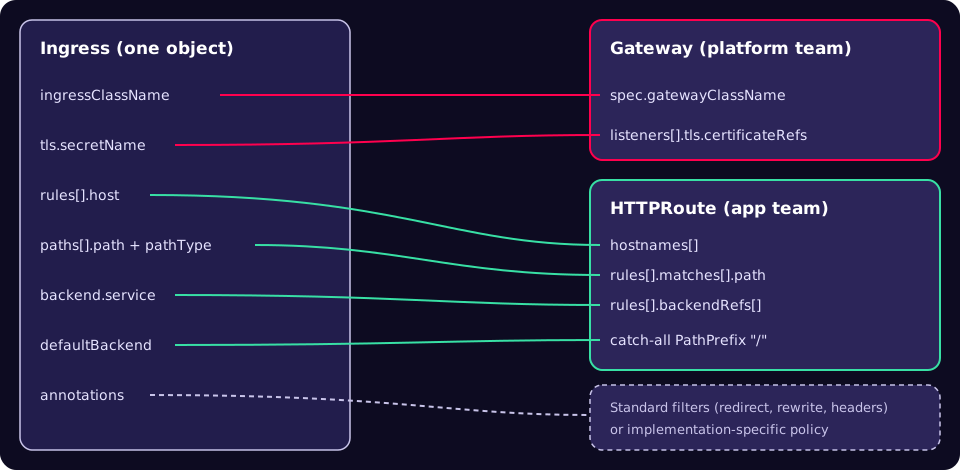
The official migration guide lists the structural differences [3]. Entry points that the Ingress controller created implicitly must now be declared as Gateway listeners. TLS termination moves from the Ingress to the listener. Routes choose their Gateway with parentRefs, rather than choosing a controller by class. There is no default backend: you write an explicit catch-all rule.
A worked example
Here is a typical Ingress for an ingress-nginx controller: one host, TLS, an API path and a catch-all.
apiVersion: networking.k8s.io/v1
kind: Ingress
metadata:
  name: shop
  namespace: shop
  annotations:
    nginx.ingress.kubernetes.io/ssl-redirect: "true"
spec:
  ingressClassName: nginx
  tls:
  - hosts: ["shop.example.com"]
    secretName: shop-example-com
  rules:
  - host: shop.example.com
    http:
      paths:
      - path: /api
        pathType: Prefix
        backend:
          service:
            name: api
            port:
              number: 8080
      - path: /
        pathType: Prefix
        backend:
          service:
            name: web
            port:
              number: 80
The Gateway API equivalent is three objects. The HTTP-to-HTTPS redirect, which was an annotation, becomes an explicit route on the port 80 listener using the standard RequestRedirect filter [3]. A redirect rule cannot also have backendRefs; the API's validation rules reject that combination [11].
apiVersion: gateway.networking.k8s.io/v1
kind: Gateway
metadata:
  name: shop-gw
  namespace: shop
spec:
  gatewayClassName: example-class   # from your chosen implementation
  listeners:
  - name: http
    port: 80
    protocol: HTTP
    hostname: shop.example.com
  - name: https
    port: 443
    protocol: HTTPS
    hostname: shop.example.com
    tls:
      mode: Terminate
      certificateRefs:
      - kind: Secret
        name: shop-example-com
---
apiVersion: gateway.networking.k8s.io/v1
kind: HTTPRoute
metadata:
  name: shop
  namespace: shop
spec:
  parentRefs:
  - name: shop-gw
    sectionName: https
  hostnames: ["shop.example.com"]
  rules:
  - matches:
    - path: { type: PathPrefix, value: /api }
    backendRefs:
    - name: api
      port: 8080
  - matches:
    - path: { type: PathPrefix, value: / }   # replaces the catch-all
    backendRefs:
    - name: web
      port: 80
---
apiVersion: gateway.networking.k8s.io/v1
kind: HTTPRoute
metadata:
  name: shop-https-redirect
  namespace: shop
spec:
  parentRefs:
  - name: shop-gw
    sectionName: http
  hostnames: ["shop.example.com"]
  rules:
  - filters:
    - type: RequestRedirect
      requestRedirect:
        scheme: https
        statusCode: 301
If your platform team runs a shared Gateway in another namespace, the HTTPRoute's parentRefs gains a namespace, and the Gateway must admit your namespace through allowedRoutes. The companion post explains that handshake.
Annotations: what maps, and what does not
| ingress-nginx annotation | Gateway API approach | Notes |
|---|---|---|
ssl-redirect | RequestRedirect filter on the HTTP listener | Standard [3] |
rewrite-target | URLRewrite filter | Does not turn matches into regex, unlike ingress-nginx [4] |
canary-weight | Weighted backendRefs | Weights are proportions, not percentages [8] |
canary-by-header | A rule with a headers match | Header matching is part of the core API |
enable-cors | HTTPRoute CORS filter | Standard since v1.5 [10] |
proxy-read-timeout | timeouts.request | Best-effort mapping only; semantics differ [5] |
proxy-body-size | No standard field | Needs an implementation-specific policy [5] |
configuration-snippet | No equivalent | Rewrite the intent with your implementation's features [5] |
Five behaviours that will bite
The Kubernetes blog published a list of ingress-nginx behaviours that do not carry over, because conformant Gateway API implementations do not reproduce them [4]. Each can turn a working URL into a 404.
- Regex matches are prefix-based and case-insensitive in ingress-nginx. Several Gateway API implementations do full, case-sensitive matches, so add
.*or(?i)deliberately if you relied on that. use-regexapplies to every path for that host, across all Ingresses. A typo that ingress-nginx tolerated as a regex becomes a 404 under anExactmatch.rewrite-targetsilently enables regex.URLRewritedoes not.- Missing trailing slashes are redirected with a 301 in some cases. The post states that "conformant Gateway API implementations do not silently configure any kind of redirects", so add an explicit redirect rule if clients depend on it.
- URLs are normalised before matching. Normalisation varies by implementation; check that backends do not rely on it.
The migration playbook
Run this per service, or per hostname, rather than per cluster. Small batches make every step reversible.
- Inventory. List controllers and Ingresses, and export them to files.
kubectl get pods --all-namespaces --selector app.kubernetes.io/name=ingress-nginxis the check the Kubernetes project suggests [1]. Record every annotation in use; that list is your risk register. - Install the CRDs and an implementation. If the platform team has not already done so, install the Standard channel CRDs for the pinned version (v1.7.0, released on 29 October 2026, is the latest at the time of writing [9]), then a conformant implementation [7].
- Convert with ingress2gateway [6]. It translates Ingress resources and supported annotations, and warns about what it cannot translate. Version 1.0 raised ingress-nginx annotation coverage from three to "over 30 common annotations" [5].
- Review every warning. The release post calls this "the most critical step" [5]. Resolve each warning explicitly: map it, replace it with an implementation policy, or record why it is not needed.
- Apply alongside the old Ingress. The Gateway gets its own address. Nothing changes for users yet.
- Check status, then compare responses. Wait for
Programmedon the Gateway andAcceptedplusResolvedRefson each route, then send the same requests to both addresses and compare. - Shift traffic in steps. Use weighted DNS or your external load balancer, as the ingress2gateway guidance suggests [5]: for example 5, 25, 50, then 100 per cent, holding at each step long enough to see real traffic.
- Bake, then clean up. Keep the Ingress and the old controller running for an agreed period at 100 per cent. Only then delete the Ingress objects and, once nothing else uses it, uninstall the controller [5].
# Step 1: inventory and export
kubectl get ingress -A -o wide
kubectl get ingress -n shop -o yaml > shop-ingress.yaml

# Step 2: Standard channel CRDs (pin the version your platform team approved)
kubectl apply --server-side -f \
  https://github.com/kubernetes-sigs/gateway-api/releases/download/v1.7.0/standard-install.yaml

# Step 3: convert (brew install ingress2gateway, or go install)
ingress2gateway print --providers=ingress-nginx \
  --input-file shop-ingress.yaml > shop-gateway.yaml

# Step 5: apply next to the existing Ingress
kubectl apply -f shop-gateway.yaml
Testing before any user sees it
Status conditions tell you whether the configuration was accepted; they do not tell you it behaves like the old setup. Do both. Route conditions are reported per parent Gateway, with reasons such as NotAllowedByListeners, NoMatchingListenerHostname and BackendNotFound [12].
# Gateway ready, and its address
kubectl -n shop wait gateway/shop-gw --for=condition=Programmed --timeout=120s
GW_IP=$(kubectl -n shop get gateway shop-gw -o jsonpath='{.status.addresses[0].value}')

# Route conditions per parent
kubectl -n shop get httproute shop -o jsonpath=\
'{range .status.parents[*].conditions[*]}{.type}={.status} ({.reason}){"\n"}{end}'

# Old controller address (service name depends on how it was installed)
OLD_IP=$(kubectl -n ingress-nginx get svc ingress-nginx-controller \
  -o jsonpath='{.status.loadBalancer.ingress[0].ip}')

# Same requests, both paths, no DNS change needed
for p in / /api/health /api /API/health /missing; do
  old=$(curl -s -o /dev/null -w '%{http_code}' --resolve shop.example.com:443:$OLD_IP https://shop.example.com$p)
  new=$(curl -s -o /dev/null -w '%{http_code}' --resolve shop.example.com:443:$GW_IP  https://shop.example.com$p)
  echo "$p old=$old new=$new"
done

# HTTP should redirect to HTTPS
curl -s -o /dev/null -w '%{http_code} %{redirect_url}\n' \
  --resolve shop.example.com:80:$GW_IP http://shop.example.com/
Build the path list from real access logs, not from memory: include upper-case variants, trailing slashes, and the regex paths from your annotation inventory. If your load balancer publishes a hostname rather than an IP, resolve it first. Any difference in status codes is a finding to resolve before step 7.
Cutover and rollback
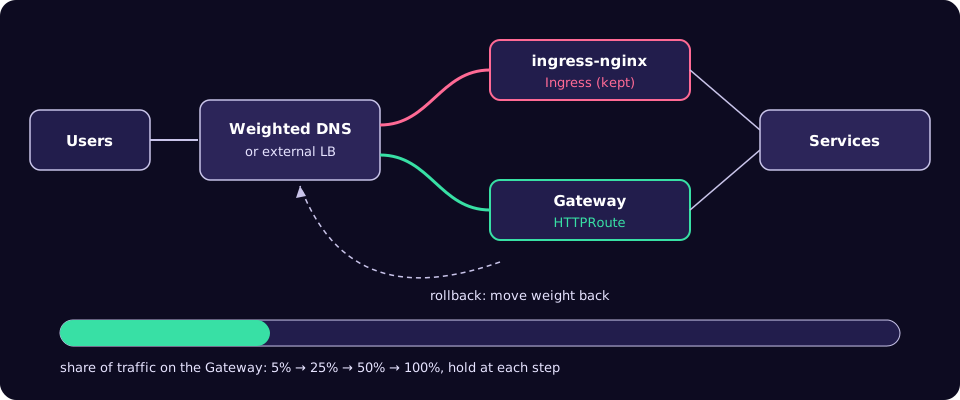
Decide the rollback triggers before you start, and write them into the change ticket.
| Stage | Watch | Rollback action |
|---|---|---|
| Applied, no traffic | Gateway Programmed, route conditions, response comparison | kubectl delete the new objects; users unaffected |
| Small share (5 to 25 per cent) | 4xx and 5xx rates per path on the Gateway versus the old controller; latency | Set the Gateway's DNS or LB weight to zero |
| Majority (50 to 100 per cent) | The same, plus redirects, CORS failures in browsers, upload size errors | Shift weight back; fix; repeat the step |
| After clean-up | Normal SLOs | Re-apply the exported Ingress and reinstall the controller: slow, so delay clean-up |
Remember DNS caching. Use a low TTL on the record you are weighting, set well before the migration, or rollback will take as long as your longest client cache.
Common mistakes
- Applying converter output unread. The ingress2gateway project describes the tool as "a migration assistant, not a one-shot replacement" [5].
- Testing only the happy path. The differences are in edge cases: case, trailing slashes, regex, encoded characters [4].
- Forgetting the HTTP listener. Ingress controllers created port 80 implicitly; a Gateway only listens where you declare it [3]. Conversely, ingress2gateway may add an HTTP-to-HTTPS redirect listener you do not want [5].
- Losing the default backend. Without an explicit
PathPrefix /rule, unmatched paths now return 404 [3]. - Deleting the Ingress on cutover day. That removes your fast rollback.
- Using Experimental fields by accident. Stick to Standard channel CRDs unless the platform team has agreed otherwise.
Per-service migration checklist
- Ingress exported to a file and stored with the change.
- Every annotation listed, with its mapping or a written reason it is dropped.
- ingress2gateway warnings reviewed and resolved.
- Gateway
Programmed; every routeAcceptedandResolvedRefs. - Response comparison run against paths taken from real logs, including edge cases.
- HTTP behaviour (redirect or not) agreed and tested.
- DNS TTL lowered in advance; weights and hold times written down.
- Rollback triggers and owner named; Ingress kept until the bake period ends.
What to do this week
- Run the ingress-nginx check in every cluster and export all Ingress objects to Git.
- Count the annotations in use:
kubectl get ingress -A -o json | jq -r '.items[].metadata.annotations // {} | keys[]' | sort | uniq -c | sort -rn. - Run
ingress2gateway printagainst the exports and read every warning. - Pick one low-risk service and complete steps 1 to 6 in a non-production cluster.
- Lower the DNS TTL on that service's record so the first real cutover can be reversed quickly.
If you would rather have experienced hands on the cutover, or on-call cover while it bakes, our SysOps 24/7 team runs Kubernetes migrations like this one.
References
- Ingress NGINX Retirement: What You Need to Know, Kubernetes blog, 11 November 2025.
- Ingress (concept documentation, note on the frozen API), Kubernetes documentation.
- Migrating from Ingress, Gateway API guides.
- Before You Migrate: Five Surprising Ingress-NGINX Behaviors You Need to Know, Kubernetes blog, 27 February 2026.
- Announcing Ingress2Gateway 1.0: Your Path to Gateway API, Kubernetes blog, 20 March 2026.
- kubernetes-sigs/ingress2gateway, GitHub.
- Getting started with Gateway API (installing the CRDs), Gateway API guides.
- HTTP traffic splitting, Gateway API guides.
- Gateway API v1.7.0 release notes, GitHub, 29 October 2026.
- Gateway API v1.5: Moving features to Stable, Kubernetes blog, 21 April 2026.
- HTTPRoute type definitions (filter validation rules), v1.7.0, GitHub.
- Route condition types and reasons, v1.7.0, GitHub.