MCP for DevOps: Give Agents Pipeline Context Without the Keys

The Model Context Protocol (MCP) lets an AI assistant read your clusters, pipelines and tickets through one standard interface instead of a pile of custom integrations. Wired carelessly, it also hands a language model the keys to production. This post shows how DevOps and platform teams can get the context benefit first, with read-only servers, scoped identities and full tracing, and add write access only where a human signs off.
What MCP gives a DevOps team
MCP is an open protocol in which servers expose tools, resources and prompts, and clients (an IDE, a chat assistant, your own agent) discover and call them. Tools are model-controlled: the model decides when to call them based on the conversation [1]. One Kubernetes server, one CI server and one ticketing server can then serve every assistant your engineers use, instead of each tool vendor building its own integration.
Adoption is broad. In December 2025 Anthropic reported more than 10,000 active public MCP servers, adoption in ChatGPT, Cursor, Gemini, Microsoft Copilot and Visual Studio Code, and deployment support from AWS, Cloudflare, Google Cloud and Microsoft Azure. The protocol now sits in the Agentic AI Foundation, a directed fund under the Linux Foundation [2]. For a platform team, that means MCP is a reasonable interface to standardise on.
It does not mean any of those 10,000 servers belong near production. The specification is clear that servers must validate inputs, enforce access control, rate-limit and sanitise outputs, and that clients should confirm sensitive operations and log tool usage for audit [1]. Those duties fall on you.
What the 2026-07-28 revision changes for operators
The current specification revision, 2026-07-28, makes several changes that matter if you run MCP servers as infrastructure [3]:
- Stateless protocol. Protocol-level sessions, the
Mcp-Session-Idheader and the initialise handshake are gone; each request carries its protocol version and capabilities. Servers that need cross-call state mint explicit handles. That makes it simpler to run servers as ordinary replicas behind a load balancer. - Routable headers. Streamable HTTP POST requests must carry
Mcp-MethodandMcp-Nameheaders, so a gateway or WAF can route, rate-limit or block by tool without parsing the body. - Cache hints. List and read results carry
ttlMsandcacheScope, and servers should return tools in a deterministic order to help client caching and prompt-cache hit rates. - Tracing. Trace context propagation through
_meta(traceparent,tracestate,baggage) is now documented, and the protocol's own Logging feature is deprecated in favour of stderr or OpenTelemetry. - Auth. Dynamic Client Registration is deprecated in favour of Client ID Metadata Documents, and clients must validate the
issparameter when it is present.
If your servers were built against 2025-11-25 or earlier, check your SDK's support for the new revision before you upgrade clients.
Where MCP earns its keep in operations
The pattern that works is "the agent gathers, a person decides". Good first candidates share three traits: the data is spread across several systems, the output has a known shape, and a wrong answer is caught by a human before it causes harm.
- Incident triage. Pull recent deploys, error-rate changes, pod events and related tickets into one timeline for the on-call engineer.
- Release readiness. Collect rollout status, pipeline results and open incidents against the change ticket.
- Runbook lookup. Answer "how do we rotate this certificate?" from your own runbooks and current cluster state, with links.
- Drift and hygiene reports. List workloads without resource limits, images without pinned tags, or alerts with no owner.
Poor first candidates are anything where the agent acts directly on production, or where it needs broad access to customer data to be useful. Leave those until the read-only foundations, identities and traces are in place.
The playbook: from read-only evidence to gated writes
The safest first use case is an evidence pack: the agent gathers deployment status, test results, open incidents and the change ticket, and writes a release-readiness summary for a human to approve. It never changes anything. Follow these steps:
- Pick one read-only job with a clear output. Release readiness or incident triage summaries are good candidates. Write down inputs, the output schema and what "done" means.
- Choose servers deliberately. Prefer official servers from the vendor of the system, or write your own thin ones. The MCP security guidance describes how a local server can run arbitrary commands with the client's privileges; clients should show the exact command before installing one and run servers sandboxed with minimal privileges [4].
- Give every server its own identity, scoped to its job. A Kubernetes server for triage needs
get,listandwatchon a handful of resources, not cluster-admin and not Secrets. See the RBAC example below. - Get authentication right. MCP servers must not accept tokens that were not issued to them, so "token passthrough" to downstream APIs is out [4]. Start clients with minimal scopes and step up only when a privileged tool is first used [4].
- Design tools for the model and the auditor. Give each tool a precise description, an
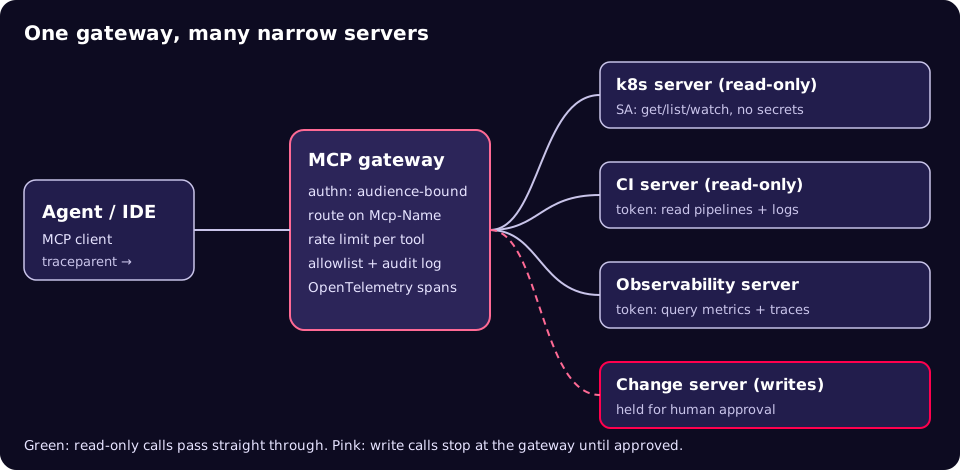
inputSchema, and anoutputSchemaso results are structured and can be validated [1]. Set annotations honestly, and remember clients must treat annotations from untrusted servers as untrusted [1]. When several servers are aggregated, prefix tool names with a server identifier to avoid collisions [1]. - Put a gateway in front. Terminate auth, route on
Mcp-Name, rate-limit per tool and hold write tools for approval. For server-side clients, the security guidance recommends an egress proxy that blocks internal destinations such as cloud metadata endpoints [4]. - Trace and log every call. OpenTelemetry's MCP conventions name spans
{mcp.method.name} {target}, for exampletools/call get_deploy_status, withgen_ai.tool.nameas an attribute [5]. They are still at "Development" status, so pin a version. - Add writes last, one at a time, behind approval. The tools specification says there should always be a human able to deny tool invocations, and that clients should show tool inputs before calling the server [1]. Make the approver see the exact arguments.
A read-only identity for a Kubernetes MCP server
apiVersion: v1
kind: ServiceAccount
metadata:
  name: mcp-k8s-readonly
  namespace: mcp
---
apiVersion: rbac.authorization.k8s.io/v1
kind: ClusterRole
metadata:
  name: mcp-k8s-readonly
rules:
  - apiGroups: [""]
    resources: ["pods", "pods/log", "services", "events", "nodes"]
    verbs: ["get", "list", "watch"]
  - apiGroups: ["apps"]
    resources: ["deployments", "replicasets", "statefulsets", "daemonsets"]
    verbs: ["get", "list", "watch"]
  # Deliberately no "secrets" and no "configmaps".
---
apiVersion: rbac.authorization.k8s.io/v1
kind: ClusterRoleBinding
metadata:
  name: mcp-k8s-readonly
roleRef:
  apiGroup: rbac.authorization.k8s.io
  kind: ClusterRole
  name: mcp-k8s-readonly
subjects:
  - kind: ServiceAccount
    name: mcp-k8s-readonly
    namespace: mcp
Prove the boundary before you connect an agent:
SA=system:serviceaccount:mcp:mcp-k8s-readonly
kubectl auth can-i list pods --all-namespaces --as=$SA      # yes
kubectl auth can-i get secrets --all-namespaces --as=$SA    # no
kubectl auth can-i delete pods --all-namespaces --as=$SA    # no
A tool definition that helps the model and the reviewer
{
  "name": "k8s.get_deploy_status",
  "title": "Deployment rollout status",
  "description": "Read-only. Returns rollout status for one Deployment: desired, updated and available replicas, and recent warning events.",
  "inputSchema": {
    "type": "object",
    "properties": {
      "namespace": { "type": "string" },
      "deployment": { "type": "string" }
    },
    "required": ["namespace", "deployment"],
    "additionalProperties": false
  },
  "outputSchema": {
    "type": "object",
    "properties": {
      "desired": { "type": "integer" },
      "updated": { "type": "integer" },
      "available": { "type": "integer" },
      "warnings": { "type": "array", "items": { "type": "string" } }
    },
    "required": ["desired", "updated", "available", "warnings"]
  },
  "annotations": { "readOnlyHint": true, "openWorldHint": false }
}
A task contract for the agent
Explicit task definitions keep the agent inside its lane. This is an internal format of our own, not a standard:
task: release_readiness_check
inputs: [change_ticket_id, target_env]
output_schema: release_readiness_report.json
tools_allowed:
  - k8s.get_deploy_status
  - ci.get_pipeline_result
  - obs.query_error_rate
  - tickets.get_change
constraints:
  - read_only
  - no_production_data_in_output
limits: { max_steps: 20, max_wall_clock: 10m }
handoff: human_approver   # the agent recommends; a person decides
Before and after: a release-readiness check
| Step | Without MCP | With read-only MCP servers |
|---|---|---|
| Gather rollout status | Engineer runs kubectl in several contexts | Agent calls k8s.get_deploy_status per service |
| Check pipeline and tests | Open the CI UI, copy links | Agent calls the CI server and links each result |
| Check error budget | Query dashboards by hand | Agent queries metrics through the observability server |
| Write the summary | Free text in the ticket | Structured report against a schema, sources linked |
| Decision | Human | Human, with the agent's evidence and a full trace |
| Audit trail | Whatever was pasted in | Every tool call, argument and result in traces and logs |
Checklist
- Every connected server is on an allowlist with a named owner and a pinned version.
- Each server has its own identity with least-privilege permissions, verified with a test such as
kubectl auth can-i. - Tokens are audience-bound to the server; no token passthrough.
- Write tools are held at the gateway for human approval, with exact arguments shown.
- Tool names are prefixed by server; descriptions, input and output schemas are reviewed like an API.
- Gateway enforces rate limits and egress rules; cloud metadata endpoints are blocked.
- Every
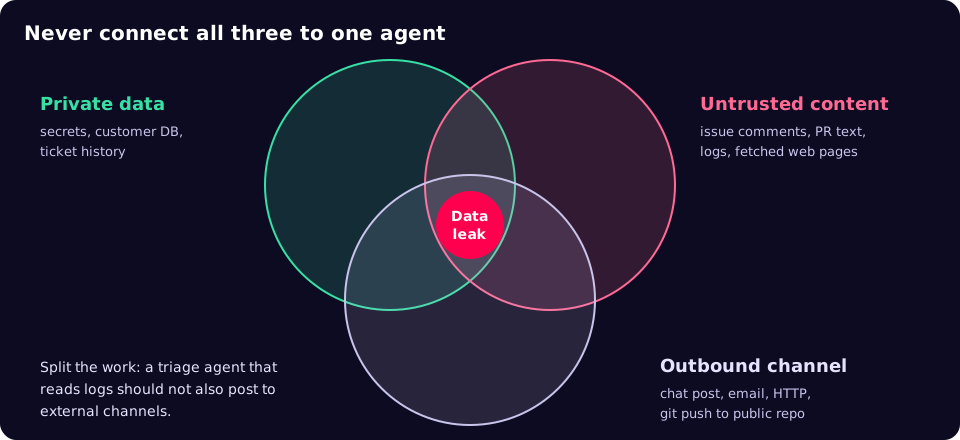
tools/callproduces a trace span and an audit log entry. - No agent combines private data, untrusted content and an outbound channel.
- Your SDKs and clients are checked against the 2026-07-28 revision before upgrade.
Common mistakes
- Reusing an admin kubeconfig "just for the pilot". Pilots become production. Start with the scoped identity.
- Installing community servers from a one-line command. A local server runs with your privileges [4]. Read it, pin it, sandbox it.
- Trusting a server's
readOnlyHint. It is a hint from the server, not an enforced permission [1]. Enforce read-only with credentials. - Connecting every available tool. More tools mean more ways to go wrong. Thoughtworks' account of Bayer's PRINCE platform puts it well: reliability comes from engineering both the context the model sees and the harness it acts in [7].
- No trace correlation. Without propagated trace context you cannot connect an agent's decision to the API call it caused.
What to do this week
- List every MCP server your engineers have configured in IDEs and assistants, with the credentials each uses.
- Create one read-only service account for a Kubernetes MCP server and prove it with
kubectl auth can-i. - Build a release-readiness evidence pack for one service using only read-only tools.
- Turn on OpenTelemetry tracing for tool calls and check you can follow one request end to end.
- Write down which tools would ever need write access, and who approves each.
MCP is a good standard for giving agents operational context, and the controls that make it safe are ones platform teams already know: scoped identities, gateways, audit logs and change approval. If you want a second pair of eyes on how your agents reach production systems, our security team can help.
References
- MCP specification: Tools (2026-07-28), Model Context Protocol.
- Donating the Model Context Protocol and establishing the Agentic AI Foundation, Anthropic, 9 December 2025.
- MCP specification 2026-07-28: Key changes, Model Context Protocol.
- MCP Security Best Practices, Model Context Protocol.
- Semantic conventions for Model Context Protocol, OpenTelemetry.
- The lethal trifecta for AI agents, Simon Willison, 16 June 2025.
- Building Reliable Agentic AI Systems, Sarang Sanjay Kulkarni, martinfowler.com, June 2026.