透過 Zalando Postgres Operator 實現 PostgreSQL 高可用性:多雲 Kubernetes 部署指南
使用 Zalando Operator 在任何 Kubernetes 平臺上部署生產級 PostgreSQL HA
 Balinder Walia2026年4月12日18 min read
簡介:為什麼 Kubernetes 上的 PostgreSQL 高可用性很重要
在生產中執行 PostgreSQL 需要高可用性 (HA)。以分鐘為單位的停機時間可能會給企業造成數百萬美元的收入損失、削弱客戶信任並違反服務級別協議。 Kubernetes 已成為編排容器化工作負載的事實平臺,但在 Kubernetes 上執行 PostgreSQL 等有狀態服務會帶來獨特的挑戰:持久儲存管理、領導者選舉、自動故障轉移、備份編排和連線池。
Zalando Postgres Operator是歐洲最大的線上時裝零售商 Zalando 構建的一款開源、經過實戰考驗的解決方案,用於管理生產中的數百個 PostgreSQL 叢集。它利用Patroni進行基於共識的領導者選舉,利用Spilo作為 PostgreSQL 容器映像,利用WAL-G進行持續歸檔和時間點恢復,利用PgBouncer進行連線池。這些元件共同提供了完全自動化、自我修復的 PostgreSQL 部署,適用於任何 Kubernetes 發行版 — 從 AWS EKS、Azure AKS 和 Google GKE 等託管雲服務到使用 Rancher 執行 k3s 的裸機叢集。
在本綜合指南中,我們將探索 Zalando Postgres Operator 的架構,逐步介紹多個 Kubernetes 平臺上的安裝和配置,深入探討複製、備份、災難恢復、監控和生產調整。最後,您將掌握在任何 Kubernetes 基礎設施上部署和操作生產級 PostgreSQL HA 叢集的知識。
Zalando Postgres 操作架構
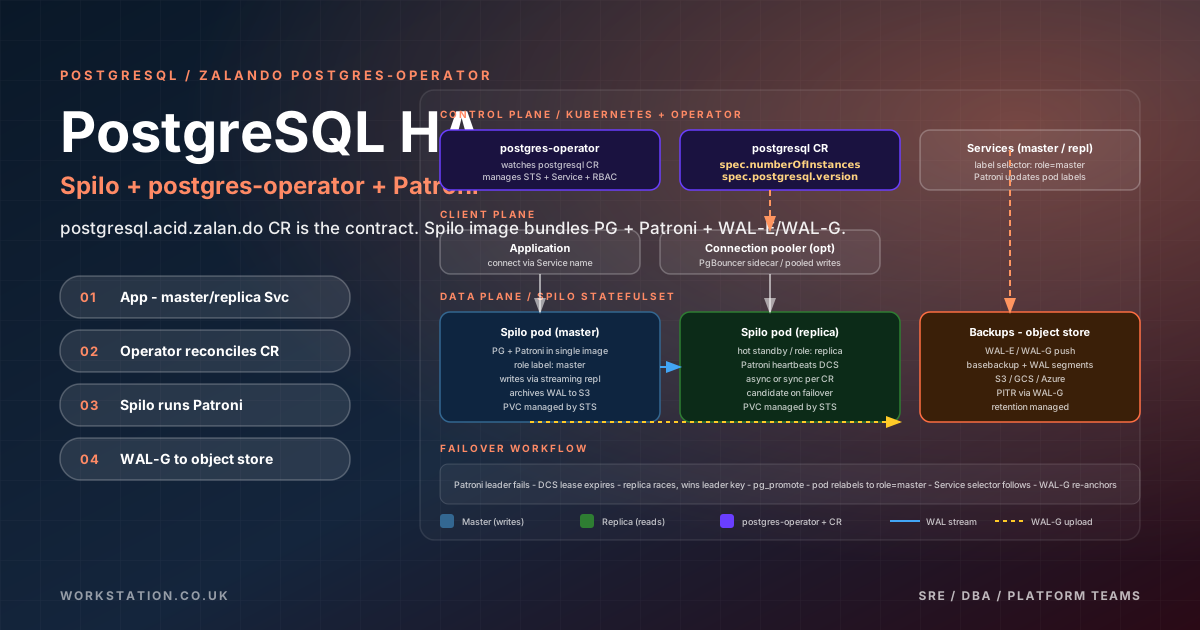
在部署之前瞭解架構至關重要。 Zalando Postgres Operator 遵循 Kubernetes 運算子模式:它監視postgresql型別的自定義資源定義 (CRD) 並將所需狀態協調為實際 Kubernetes 資源。 以下是元件的組合方式:
Spilo:PostgreSQL 容器映像
Spilo是 Zalando 的 Docker 映像,它將 PostgreSQL 與 Patroni、WAL-G 和基本擴充套件捆綁在一起。 StatefulSet 中的每個 Pod 都執行一個 Spilo 容器。 Spilo 手柄:
- PostgreSQL 伺服器— 資料庫引擎本身,支援版本 13 至 16
- Patroni— 管理領導者選舉、複製和故障轉移的 HA 代理
- WAL-G— 連續 WAL 歸檔和基礎備份工具
- pg_cron、pg_stat_statements、PostGIS— 預裝的常用擴充套件
Patroni:領導者選舉和自動故障轉移
Patroni 是 HA 機制的核心。它使用分散式配置儲存(DCS)來維護叢集狀態並執行領導者選舉。在 Zalando 運營商環境中,Patroni 使用Kubernetes API本身作為 DCS(透過端點或 ConfigMap),從而無需外部 etcd 或 ZooKeeper 叢集。
以下是 Patroni 故障轉移過程的工作原理:
- 執行狀況檢查— 每個 Patroni 代理持續監控其本地 PostgreSQL 例項並向 DCS 報告執行狀況。
- 領導者鎖— 主裝置在 DCS(Kubernetes 端點物件)中持有領導者鎖。鎖有一個 TTL(預設 30 秒)。
- 故障檢測— 如果主節點未能在 TTL 內更新其鎖定,副本將檢測到這種情況。
- 選舉— 合格的副本競爭領導者鎖。複製延遲最小的副本獲勝。
- 升級— 獲勝副本將自身升級為主副本,更新 DCS,並且 Kubernetes
master服務端點自動更新。 - 防護— 舊的主節點被防護(停止或降級為副本)以防止腦裂。
整個故障轉移過程通常會在15-30 秒內完成,從而確保最短的應用程式停機時間。
WAL-G:連續歸檔和備份
WAL-G 是 PostgreSQL 的下一代歸檔工具,支援備份到 S3、Google Cloud Storage (GCS) 和 Azure Blob Storage。它提供:
- 基本備份— 使用
pg_basebackup進行完整物理備份 - WAL 歸檔— 用於時間點恢復的連續預寫日誌傳送
- 增量備份— 僅儲存更改頁面的增量備份
- 加密— 靜態備份的 AES-256 加密
- 壓縮— LZ4 或 ZSTD 壓縮可降低儲存成本
Kubernetes 資源層次結構
當您建立postgresql自定義資源時,操作員將建立一組全面的 Kubernetes 資源來管理叢集。瞭解此層次結構對於故障排除和監控非常重要:
資源- StatefulSet— 管理具有穩定網路身份和有序部署的 PostgreSQL Pod
- 服務— 兩個 ClusterIP 服務:用於主資料庫的
<cluster-name>和用於只讀副本的<cluster-name>-repl - 端點— Patroni 更新端點以指向當前領導者以實現無縫故障轉移
- PodDisruptionBudgets (PDB)— 確保至少一個例項在自願中斷期間保持可用
- Secrets— PostgreSQL 超級使用者、複製和應用程式憑證儲存為 Kubernetes Secrets
- PersistentVolumeClaims (PVCs)— 每個 Pod 一個 PVC,用於 PostgreSQL 資料儲存
- PgBouncer 部署— 可選連線池,作為單獨的部署部署,具有自己的服務
在多個 Kubernetes 平臺上的安裝
先決條件
<cluster-name>和用於只讀副本的<cluster-name>-repl在安裝 Zalando Postgres Operator 之前,請確保您擁有:
- 正在執行的 Kubernetes 叢集 (v1.25+)
kubectl配置有叢集管理員訪問許可權helmv3 安裝- 預設 StorageClass 配置的
操作員安裝
推薦安裝方式使用Helm。這在所有 Kubernetes 平臺上一致工作:
# Add the Zalando Postgres Operator Helm repository
helm repo add postgres-operator-charts https://opensource.zalando.com/postgres-operator/charts/postgres-operator
helm repo add postgres-operator-ui-charts https://opensource.zalando.com/postgres-operator/charts/postgres-operator-ui
helm repo update

# Create a dedicated namespace
kubectl create namespace postgres-operator

# Install the operator with custom values
helm install postgres-operator postgres-operator-charts/postgres-operator \
  --namespace postgres-operator \
  --set configKubernetes.enable_pod_antiaffinity=true \
  --set configKubernetes.pod_environment_configmap=postgres-pod-config \
  --set configAwsOrGcp.aws_region=us-east-1 \
  --set configLoadBalancer.db_hosted_zone=db.example.com \
  --set configConnectionPooler.connection_pooler_default_cpu_request=500m \
  --set configConnectionPooler.connection_pooler_default_memory_request=100Mi

# Optionally install the operator UI for visual management
helm install postgres-operator-ui postgres-operator-ui-charts/postgres-operator-ui \
  --namespace postgres-operator
驗證操作員是否正在執行:
kubectl get pods -n postgres-operator
# Expected output:
# NAME                                 READY   STATUS    RESTARTS   AGE
# postgres-operator-7f8b9c6d4-x2k9j   1/1     Running   0          2m
AWS EKS 部署細節
Amazon EKS 需要特定配置才能實現最佳 PostgreSQL 效能:
# EKS-specific Helm values (eks-values.yaml)
configAwsOrGcp:
  aws_region: us-east-1
  enable_ebs_gp3_migration: true
  additional_secret_mount: "aws-iam-token"

configKubernetes:
  enable_pod_antiaffinity: true
  pod_environment_configmap: "postgres-pod-config"
  spilo_privileged: false
  storage_resize_mode: pvc

# Use EBS gp3 StorageClass for better performance
# Create the StorageClass first:
---
apiVersion: storage.k8s.io/v1
kind: StorageClass
metadata:
  name: ebs-gp3-postgres
provisioner: ebs.csi.aws.com
parameters:
  type: gp3
  iops: "6000"
  throughput: "400"
  encrypted: "true"
reclaimPolicy: Retain
volumeBindingMode: WaitForFirstConsumer
allowVolumeExpansion: true
對於 EKS 上的 WAL-G 備份,為服務賬戶 (IRSA) 配置 IAM 角色:
# Create IAM policy for WAL-G S3 access
{
  "Version": "2012-10-17",
  "Statement": [
    {
      "Effect": "Allow",
      "Action": [
        "s3:PutObject",
        "s3:GetObject",
        "s3:ListBucket",
        "s3:DeleteObject",
        "s3:GetBucketLocation"
      ],
      "Resource": [
        "arn:aws:s3:::my-pg-backups",
        "arn:aws:s3:::my-pg-backups/*"
      ]
    }
  ]
}
Azure AKS 部署
Azure AKS 使用 Azure 磁碟進行持久儲存,使用託管身份進行備份身份驗證:
# AKS-specific StorageClass
apiVersion: storage.k8s.io/v1
kind: StorageClass
metadata:
  name: managed-premium-postgres
provisioner: disk.csi.azure.com
parameters:
  skuName: Premium_LRS
  cachingMode: ReadOnly
reclaimPolicy: Retain
volumeBindingMode: WaitForFirstConsumer
allowVolumeExpansion: true
---
# WAL-G backup to Azure Blob Storage environment variables
apiVersion: v1
kind: ConfigMap
metadata:
  name: postgres-pod-config
  namespace: default
data:
  AZURE_STORAGE_ACCOUNT: "pgbackupsstorage"
  AZURE_STORAGE_ACCESS_KEY: "" # Use Managed Identity instead
  WALG_AZ_PREFIX: "azure://pg-wal-backups/$(SCOPE)"
  USE_WALG_BACKUP: "true"
  USE_WALG_RESTORE: "true"
  BACKUP_SCHEDULE: "0 2 * * *"
  BACKUP_NUM_TO_RETAIN: "7"
Google GKE 部署
Google Kubernetes 引擎使用持久磁碟和工作負載身份進行 GCS 備份訪問:
# GKE StorageClass for SSD Persistent Disks
apiVersion: storage.k8s.io/v1
kind: StorageClass
metadata:
  name: ssd-postgres
provisioner: pd.csi.storage.gke.io
parameters:
  type: pd-ssd
reclaimPolicy: Retain
volumeBindingMode: WaitForFirstConsumer
allowVolumeExpansion: true
---
# GCS backup configuration
apiVersion: v1
kind: ConfigMap
metadata:
  name: postgres-pod-config
  namespace: default
data:
  WALG_GS_PREFIX: "gs://my-pg-backups/$(SCOPE)"
  USE_WALG_BACKUP: "true"
  USE_WALG_RESTORE: "true"
  GOOGLE_APPLICATION_CREDENTIALS: "/var/secrets/google/key.json"
  BACKUP_SCHEDULE: "0 2 * * *"
  BACKUP_NUM_TO_RETAIN: "7"
裸機 k3s/帶 Longhorn 儲存的 Rancher
對於本地部署,k3s 提供輕量級 Kubernetes 發行版,Longhorn 提供分散式塊儲存。當您需要完全控制基礎設施而不被雲供應商鎖定時,這種組合是理想的選擇。
# Install k3s on all nodes
# Master node:
curl -sfL https://get.k3s.io | sh -s - server \
  --cluster-init \
  --disable traefik \
  --write-kubeconfig-mode 644

# Worker nodes:
curl -sfL https://get.k3s.io | sh -s - agent \
  --server https://master-ip:6443 \
  --token $(cat /var/lib/rancher/k3s/server/node-token)

# Install Longhorn for persistent storage
helm repo add longhorn https://charts.longhorn.io
helm install longhorn longhorn/longhorn \
  --namespace longhorn-system \
  --create-namespace \
  --set defaultSettings.defaultReplicaCount=3 \
  --set defaultSettings.defaultDataPath=/mnt/longhorn

# Install MetalLB for LoadBalancer services
kubectl apply -f https://raw.githubusercontent.com/metallb/metallb/v0.14.5/config/manifests/metallb-native.yaml

# Configure MetalLB IP pool
apiVersion: metallb.io/v1beta1
kind: IPAddressPool
metadata:
  name: postgres-pool
  namespace: metallb-system
spec:
  addresses:
- 192.168.1.200-192.168.1.210PostgreSQL 叢集 CRD 規格
部署核心 具有 Zalando 運營商的 PostgreSQL 叢集是postgresql自定義資源。此 YAML 清單宣告瞭叢集的所需狀態,操作員將其調整為現實。以下是全面的、可投入生產的 CRD 規格:
apiVersion: acid.zalan.do/v1
kind: postgresql
metadata:
  name: pg-production-cluster
  namespace: databases
  labels:
    team: platform
    environment: production
spec:
  teamId: "platform"
  volume:
    size: 100Gi
    storageClass: ebs-gp3-postgres
  numberOfInstances: 3
  enableConnectionPooler: true
  enableReplicaConnectionPooler: true
  connectionPooler:
    numberOfInstances: 2
    mode: transaction
    schema: pooler
    user: pooler
    resources:
      requests:
        cpu: 500m
        memory: 100Mi
      limits:
        cpu: "1"
        memory: 256Mi
  users:
    app_user:
    - superuser
    - createdb
    readonly_user: []
  databases:
    app_database: app_user
  postgresql:
    version: "16"
    parameters:
      shared_buffers: "2GB"
      max_connections: "200"
      work_mem: "64MB"
      maintenance_work_mem: "512MB"
      effective_cache_size: "6GB"
      random_page_cost: "1.1"
      effective_io_concurrency: "200"
      wal_buffers: "64MB"
      max_wal_size: "4GB"
      min_wal_size: "1GB"
      checkpoint_completion_target: "0.9"
      default_statistics_target: "100"
      log_statement: "ddl"
      log_min_duration_statement: "1000"
      idle_in_transaction_session_timeout: "600000"
      lock_timeout: "30000"
      statement_timeout: "60000"
  patroni:
    initdb:
      encoding: "UTF8"
      locale: "en_US.UTF-8"
      data-checksums: "true"
    pg_hba:
    - hostssl all all 0.0.0.0/0 md5
    - host    all all 0.0.0.0/0 md5
    ttl: 30
    loop_wait: 10
    retry_timeout: 10
    synchronous_mode: false
    synchronous_mode_strict: false
    maximum_lag_on_failover: 33554432
  resources:
    requests:
      cpu: "2"
      memory: 8Gi
    limits:
      cpu: "4"
      memory: 16Gi
  podAnnotations:
    prometheus.io/scrape: "true"
    prometheus.io/port: "9187"
  tolerations:
  - key: "database"
    operator: "Equal"
    value: "postgres"
    effect: "NoSchedule"
  nodeAffinity:
    requiredDuringSchedulingIgnoredDuringExecution:
      nodeSelectorTerms:
      - matchExpressions:
        - key: workload-type
          operator: In
          values:
          - database
  enableShmVolume: true
  spiloRunAsUser: 101
  spiloRunAsGroup: 103
  spiloFSGroup: 103
CRD 關鍵欄位說明
- numberOfInstances— Pod 總數。操作員會自動將其中一個指定為主副本,將其餘副本指定為流副本。
- enableConnectionPooler— 為主要服務部署 PgBouncer sidecar,從而減少連線開銷。
- enableReplicaConnectionPooler— 為副本服務部署單獨的 PgBouncer,這對於讀取繁重的工作負載至關重要。
- postgresql.parameters— 直接傳遞到
postgresql.conf的 PostgreSQL 配置引數。 - patroni— 配置 Patroni 行為,包括 TTL、迴圈等待、重試超時和同步複製模式。
- volume.storageClass— 對映到特定於平臺的 StorageClass(AWS 上的 EBS gp3、Azure 上的 Premium SSD、GCP 上的 SSD PD、k3s 上的 Longhorn)。
- enableShmVolume— 在
/dev/shm上安裝tmpfs,用於 PostgreSQL 共享記憶體,這對效能至關重要。
與 PgBouncer
的連線池PostgreSQL 的按連線處理模型使得處理大量客戶端連線的成本很高。每個連線消耗大約 10MB 的 RAM。 PgBouncer 透過在一小部分實際 PostgreSQL 連線上覆用數千個客戶端連線來解決這個問題。
Zalando 運營商原生支援 PgBouncer 部署。當您在CRD中設定enableConnectionPooler: true時,操作員建立:
- 具有可配置副本數量的 PgBouncer 部署
- 用於池連線的專用服務 (
<cluster-name>-pooler) - 與 PostgreSQL 自動憑證同步
PgBouncer 配置模式
# PgBouncer connection pooler modes:
#
# transaction (recommended for most workloads)
#   - Connection returned to pool after each transaction
#   - Best balance of efficiency and compatibility
#   - Cannot use session-level features (prepared statements, temp tables)
#
# session
#   - Connection held for entire client session
#   - Full PostgreSQL compatibility
#   - Lower pooling efficiency
#
# statement
#   - Connection returned after each statement
#   - Most efficient but most restrictive
#   - Only works with autocommit queries

# Custom PgBouncer configuration via operator
spec:
  connectionPooler:
    numberOfInstances: 3
    mode: transaction
    schema: pooler
    user: pooler
    defaultPoolSize: 25
    maxDBConnections: 100
    resources:
      requests:
        cpu: 250m
        memory: 128Mi
      limits:
        cpu: "1"
        memory: 256Mi
對於需要準備好的語句或會話級功能的應用程式,可以繞過 PgBouncer 直接連線到 PostgreSQL 服務,或者使用session池模式,但會降低連線效率。
多區域 PostgreSQL 複製
對於需要從多個地理位置低延遲讀取或跨區域災難恢復的全球應用程式,多區域複製至關重要。 Zalando 操作員透過備用叢集支援這一點,這些備用叢集透過流複製或 WAL-G 存檔從主叢集進行復制。
流複製配置
PostgreSQL 流複製是 Zalando 運營商中 HA 的基礎。它的工作原理是近乎實時地將預寫日誌 (WAL) 記錄從主伺服器傳送到副本。操作員會自動進行配置,但瞭解詳細資訊有助於調整和故障排除。
- 同步複製— 主節點在提交事務之前等待至少一個副本確認 WAL 接收。這保證了零資料丟失 (RPO=0),但增加了延遲。使用
patroni.synchronous_mode: true啟用。 - 非同步複製— 主節點立即提交併非同步傳送 WAL。延遲稍低,但故障轉移期間可能會丟失資料。這是預設設定。
- 級聯複製— 副本可以從其他副本而不是主副本進行復制,從而減少大型叢集中主副本的負載。
# Enable synchronous replication for zero data loss
spec:
  patroni:
    synchronous_mode: true
    synchronous_mode_strict: false  # Allow async if no sync replica available
    synchronous_node_count: 1       # Number of sync replicas required
  postgresql:
    parameters:
      synchronous_commit: "on"      # Matches Patroni synchronous_mode
      max_wal_senders: "10"         # Maximum WAL sender processes
      wal_keep_size: "1GB"          # WAL retention for replica catch-up
      hot_standby: "on"             # Allow queries on replicas
      hot_standby_feedback: "on"    # Reduce query conflicts on replicas
使用 WAL-G
進行備份和恢復WAL-G 備份配置
正確的備份配置對於災難恢復至關重要。 Zalando 操作員整合了 WAL-G 以連續備份到物件儲存。以下是 S3 相容儲存的完整配置:
# ConfigMap for WAL-G backup configuration
apiVersion: v1
kind: ConfigMap
metadata:
  name: postgres-pod-config
  namespace: databases
data:
  # S3 backup configuration
  AWS_ENDPOINT: "https://s3.us-east-1.amazonaws.com"
  AWS_S3_FORCE_PATH_STYLE: "false"
  AWS_REGION: "us-east-1"
  WALG_S3_PREFIX: "s3://my-pg-backups/$(SCOPE)"
  WALG_DISABLE_S3_SSE: "false"
  WALG_S3_SSE: "aws:kms"
  WALG_S3_SSE_KMS_ID: "arn:aws:kms:us-east-1:123456789:key/mrk-abcdef"

  # Backup scheduling and retention
  USE_WALG_BACKUP: "true"
  USE_WALG_RESTORE: "true"
  BACKUP_SCHEDULE: "0 1 * * *"       # Daily at 1 AM UTC
  BACKUP_NUM_TO_RETAIN: "14"          # Keep 14 daily backups

  # WAL archiving
  WALG_COMPRESSION_METHOD: "zstd"     # Better compression than lz4
  WALG_DELTA_MAX_STEPS: "6"           # Delta backups between full backups
  WALG_UPLOAD_CONCURRENCY: "4"        # Parallel upload streams
  WALG_DOWNLOAD_CONCURRENCY: "4"      # Parallel download for restore
  WALG_UPLOAD_DISK_CONCURRENCY: "4"   # Disk read concurrency

  # Clone configuration
  CLONE_AWS_ENDPOINT: "https://s3.us-east-1.amazonaws.com"
  CLONE_AWS_REGION: "us-east-1"
  CLONE_WALG_S3_PREFIX: "s3://my-pg-backups/$(CLONE_SCOPE)"
  CLONE_METHOD: "CLONE_WITH_WALG"
  CLONE_USE_WALG_RESTORE: "true"
時間點恢復 (PITR)
PITR 允許您將資料庫恢復到任何特定時刻,這對於從意外資料刪除或損壞中恢復至關重要。 Zalando運營商透過克隆機制支援PITR:
# Clone a cluster with PITR
apiVersion: acid.zalan.do/v1
kind: postgresql
metadata:
  name: pg-restored-cluster
  namespace: databases
spec:
  teamId: "platform"
  volume:
    size: 100Gi
    storageClass: ebs-gp3-postgres
  numberOfInstances: 3
  postgresql:
    version: "16"
  clone:
    cluster: "pg-production-cluster"
    timestamp: "2026-04-11T14:30:00+00:00"  # Restore to this exact moment
    s3_wal_path: "s3://my-pg-backups/wal/16/pg-production-cluster"
    s3_endpoint: "https://s3.us-east-1.amazonaws.com"
    s3_access_key_id: ""      # Use IAM role instead
    s3_secret_access_key: ""  # Use IAM role instead
應用 CRD 時,操作員執行以下步驟:
- 查詢目標時間戳之前的最新基礎備份
- 將基礎備份恢復到新 StatefulSet 的主 Pod
- 重放 WAL 段直至指定時間戳
- 開啟資料庫進行讀寫操作
- 設定到副本 Pod 的流式複製
用於災難恢復的備用叢集
備用叢集持續從主叢集進行復制,提供可在災難期間升級的熱備用。這與叢集內的副本不同 - 備用叢集是完全獨立的 Kubernetes 資源,可以在不同的名稱空間、叢集甚至區域中執行。
# Standby cluster in a different region
apiVersion: acid.zalan.do/v1
kind: postgresql
metadata:
  name: pg-standby-eu
  namespace: databases
spec:
  teamId: "platform"
  volume:
    size: 100Gi
    storageClass: managed-premium-postgres
  numberOfInstances: 2
  postgresql:
    version: "16"
  standby:
    standby_host: "pg-production-cluster.databases.svc.cluster.local"
    standby_port: "5432"
    # Alternative: replicate from S3 WAL archive
    # s3_wal_path: "s3://my-pg-backups/wal/16/pg-production-cluster"
  enableConnectionPooler: true
  enableReplicaConnectionPooler: true
要將備用叢集升級為獨立主叢集(在災難恢復期間),只需從 CRD 中刪除standby部分並應用:
# Edit the standby cluster CRD to remove standby section
kubectl patch postgresql pg-standby-eu -n databases --type json \
  -p '[{"op": "remove", "path": "/spec/standby"}]'

# The operator will promote the standby to primary
# Update your application DNS/service mesh to point to the new primary
使用 Prometheus 和 Grafana 進行監控
全面監控對於生產 PostgreSQL 部署來說是不容忽視的。 Zalando 運營商支援透過postgres_exportersidecar 匯出 Prometheus 指標。以下是如何設定完整的監控堆疊:
ServiceMonitor
# ServiceMonitor for PostgreSQL metrics
apiVersion: monitoring.coreos.com/v1
kind: ServiceMonitor
metadata:
  name: postgres-monitor
  namespace: databases
  labels:
    team: platform
    release: prometheus
spec:
  selector:
    matchLabels:
      team: platform
  namespaceSelector:
    matchNames:
    - databases
  endpoints:
  - port: exporter
    interval: 15s
    scrapeTimeout: 10s
    path: /metrics
    relabelings:
    - sourceLabels: [__meta_kubernetes_pod_label_spilo_role]
      targetLabel: role
    - sourceLabels: [__meta_kubernetes_pod_label_cluster_name]
      targetLabel: cluster
---
# PodMonitor alternative (scrapes pods directly)
apiVersion: monitoring.coreos.com/v1
kind: PodMonitor
metadata:
  name: postgres-pod-monitor
  namespace: databases
spec:
  selector:
    matchLabels:
      application: spilo
  podMetricsEndpoints:
  - port: exporter
    interval: 15s
    path: /metrics
監控
的關鍵指標以下是需要在 Grafana 儀表板中跟蹤的最關鍵的 PostgreSQL 指標:
- pg_stat_replication_lag— 複製延遲(以位元組和秒為單位)。如果滯後超過 RPO 閾值,則發出警報。
- pg_stat_activity_count— 按狀態劃分的活動連線。連線池耗盡時發出警報。
- pg_stat_database_tup_fetched/returned/inserted/updated/deleted— 查詢吞吐量指標。
- pg_stat_bgwriter_buffers_checkpoint/clean/backend— 緩衝區管理效率。
- pg_database_size_bytes— 容量規劃的資料庫大小隨著時間的推移而增長。
- pg_locks_count— 鎖爭用。對過多的等待鎖發出警報。
- pg_stat_statements_calls/mean_time— 查詢效能統計資訊以進行最佳化。
- patroni_postgres_running— Patroni 執行狀況(1 = 正在執行,0 = 關閉)。
- patoni_master— 哪個 pod 是當前主節點(1 = 主節點,0 = 副本節點)。
- pg_up— 基本 PostgreSQL 可用性探測器。
警報規則
# PrometheusRule for PostgreSQL alerts
apiVersion: monitoring.coreos.com/v1
kind: PrometheusRule
metadata:
  name: postgres-alerts
  namespace: databases
spec:
  groups:
  - name: postgresql.rules
    rules:
    - alert: PostgreSQLDown
      expr: pg_up == 0
      for: 1m
      labels:
        severity: critical
      annotations:
        summary: "PostgreSQL instance {{ $labels.instance }} is down"
    - alert: PostgreSQLReplicationLag
      expr: pg_stat_replication_pg_wal_lsn_diff > 100000000
      for: 5m
      labels:
        severity: warning
      annotations:
        summary: "Replication lag is {{ $value }} bytes on {{ $labels.instance }}"
    - alert: PostgreSQLHighConnections
      expr: sum(pg_stat_activity_count) by (instance) > 180
      for: 5m
      labels:
        severity: warning
      annotations:
        summary: "{{ $value }} active connections on {{ $labels.instance }}"
    - alert: PostgreSQLDeadlocks
      expr: rate(pg_stat_database_deadlocks[5m]) > 0
      for: 1m
      labels:
        severity: warning
      annotations:
        summary: "Deadlocks detected on {{ $labels.datname }}"
    - alert: PatroniFailover
      expr: changes(patroni_master[5m]) > 0
      labels:
        severity: critical
      annotations:
        summary: "Patroni failover occurred in cluster {{ $labels.cluster }}"
生產調整指南
正確的調整對於在 Kubernetes 上從 PostgreSQL 獲得最大效能至關重要。應根據您的 Pod 資源限制和工作負載特徵調整以下引數。
儲存器配置
# For a pod with 16GB memory limit:
postgresql:
  parameters:
    # shared_buffers: 25% of total memory
    shared_buffers: "4GB"

    # effective_cache_size: 75% of total memory
    # (tells planner how much OS cache to expect)
    effective_cache_size: "12GB"

    # work_mem: shared_buffers / (max_connections * 2)
    # Conservative to prevent OOM
    work_mem: "10MB"

    # maintenance_work_mem: 5-10% of total memory
    # Used for VACUUM, CREATE INDEX, ALTER TABLE
    maintenance_work_mem: "1GB"

    # temp_buffers: memory for temp tables per session
    temp_buffers: "32MB"

    # huge_pages: try to use huge pages (requires OS config)
    huge_pages: "try"
WAL 和檢查點配置
postgresql:
  parameters:
    # WAL settings
    wal_buffers: "64MB"           # 1/32 of shared_buffers, max 64MB
    wal_compression: "zstd"        # Compress WAL (PG 15+)
    max_wal_size: "8GB"            # Before forced checkpoint
    min_wal_size: "2GB"            # WAL disk reservation
    wal_level: "replica"           # Required for replication

    # Checkpoint settings
    checkpoint_completion_target: "0.9"  # Spread I/O over 90% of interval
    checkpoint_timeout: "15min"          # Max time between checkpoints
查詢規劃器和 I/O
postgresql:
  parameters:
    # Cost parameters for SSD storage
    random_page_cost: "1.1"          # SSD: close to seq_page_cost
    seq_page_cost: "1.0"             # Sequential I/O baseline
    effective_io_concurrency: "200"   # Concurrent I/O for SSD

    # Planner behavior
    default_statistics_target: "200"  # More accurate statistics
    from_collapse_limit: 12           # JOIN planning threshold
    join_collapse_limit: 12           # JOIN planning threshold

    # Parallel queries
    max_parallel_workers_per_gather: "4"
    max_parallel_workers: "8"
    max_parallel_maintenance_workers: "4"
    parallel_tuple_cost: "0.01"
    parallel_setup_cost: "1000"
連線和記錄
postgresql:
  parameters:
    # Connection limits
    max_connections: "200"                   # Keep low, use PgBouncer
    superuser_reserved_connections: "5"       # Reserve for admin access

    # Logging for troubleshooting
    log_statement: "ddl"                     # Log DDL statements
    log_min_duration_statement: "500"         # Log queries > 500ms
    log_checkpoints: "on"                    # Log checkpoint activity
    log_connections: "off"                   # Too noisy in production
    log_disconnections: "off"                # Too noisy in production
    log_lock_waits: "on"                     # Log lock waits
    log_temp_files: "0"                      # Log all temp file usage
    log_autovacuum_min_duration: "1000"       # Log slow autovacuum

    # Statement timeouts
    statement_timeout: "60000"               # 60 second query timeout
    lock_timeout: "30000"                    # 30 second lock timeout
    idle_in_transaction_session_timeout: "600000"  # 10 min idle txn timeout
滾動更新和版本升級
小版本升級
當您更新 Spilo 映像標籤時,操作員會自動處理次要版本升級(例如,16.2 至 16.3)。 操作員執行滾動重啟:
# Update the operator configuration to use a new Spilo image
helm upgrade postgres-operator postgres-operator-charts/postgres-operator \
  --namespace postgres-operator \
  --set configGeneral.docker_image=ghcr.io/zalando/spilo-16:3.1-p1 \
  --reuse-values

# The operator will perform rolling updates:
# 1. Restart replicas one at a time
# 2. Failover the primary to a freshly updated replica
# 3. Restart the old primary (now a replica)
主要版本升級
主要版本升級(例如 PostgreSQL 15 至 16)需要更仔細的規劃。 Zalando運營商支援使用pg_upgrade進行就地重大升級:
# Step 1: Update the CRD to the new major version
spec:
  postgresql:
    version: "16"  # Changed from "15"

# Step 2: The operator detects the version change and:
# a) Scales down the StatefulSet to 1 replica
# b) Runs pg_upgrade on the primary pod
# c) Scales back up to the desired numberOfInstances
# d) Replicas are rebuilt from the upgraded primary

# Step 3: Verify the upgrade
kubectl exec -it pg-production-cluster-0 -n databases -- \
  su postgres -c "psql -c 'SELECT version()'"

# Step 4: Run ANALYZE to update statistics after upgrade
kubectl exec -it pg-production-cluster-0 -n databases -- \
  su postgres -c "psql -c 'ANALYZE VERBOSE'"
重大升級的重要注意事項:
- 在升級 之前始終進行全新備份
- 首先在克隆叢集上測試升級
- 主要升級需要停機(通常為 5-30 分鐘,具體取決於資料庫大小)
- 檢視 PostgreSQL 發行說明以瞭解重大更改
- 副本重建後密切監控複製延遲
- 在所有資料庫上執行
ANALYZE以重新生成查詢規劃器統計資訊
高階操作模式
邏輯備份
除了物理 WAL-G 備份外,運營商還支援使用pg_dump進行邏輯備份。邏輯備份對於跨版本遷移和選擇性表恢復非常有用:
# Enable logical backups in the operator configuration
helm upgrade postgres-operator postgres-operator-charts/postgres-operator \
  --namespace postgres-operator \
  --set configLogicalBackup.logical_backup_schedule="0 3 * * *" \
  --set configLogicalBackup.logical_backup_s3_bucket="my-pg-logical-backups" \
  --set configLogicalBackup.logical_backup_s3_region="us-east-1" \
  --set configLogicalBackup.logical_backup_s3_sse="AES256" \
  --reuse-values

# The operator creates a CronJob for each cluster that:
# 1. Connects to the primary PostgreSQL instance
# 2. Runs pg_dumpall (or pg_dump per database)
# 3. Compresses and uploads to S3
自定義 Pod 環境變數
您可以使用 ConfigMap 將環境變數注入 Spilo pod。這對於配置 WAL-G、自定義指令碼或調整作業系統級引數非常有用:
apiVersion: v1
kind: ConfigMap
metadata:
  name: postgres-pod-config
  namespace: databases
data:
  # Custom Spilo configurations
  SPILO_CONFIGURATION: |
    bootstrap:
      dcs:
        ttl: 30
        loop_wait: 10
        retry_timeout: 10
        maximum_lag_on_failover: 33554432
        postgresql:
          use_pg_rewind: true
          use_slots: true
          parameters:
            archive_mode: "on"
            archive_timeout: 1800s
  # Enable pg_stat_statements
  POSTGRESQL_SHARED_PRELOAD_LIBRARIES: "bg_mon,pg_stat_statements,pgextwlist,pg_auth_mon,set_user,timescaledb,pg_cron,pg_stat_kcache"
  # Cron jobs inside PostgreSQL
  ENABLE_PG_CRON: "true"
安全網路策略
在生產中,使用 Kubernetes 網路策略限制對 PostgreSQL Pod 的網路訪問:
apiVersion: networking.k8s.io/v1
kind: NetworkPolicy
metadata:
  name: postgres-network-policy
  namespace: databases
spec:
  podSelector:
    matchLabels:
      application: spilo
  policyTypes:
  - Ingress
  - Egress
  ingress:
  - from:
    - namespaceSelector:
        matchLabels:
          name: app-namespace
    - podSelector:
        matchLabels:
          app: backend
    ports:
    - protocol: TCP
      port: 5432
    - protocol: TCP
      port: 8008   # Patroni REST API
  - from:
    - namespaceSelector:
        matchLabels:
          name: monitoring
    ports:
    - protocol: TCP
      port: 9187   # Prometheus exporter
  egress:
  - to:
    - ipBlock:
        cidr: 0.0.0.0/0
    ports:
    - protocol: TCP
      port: 443    # S3/GCS/Azure for backups
常見問題故障排除
即使實現自動化,也會出現問題。以下是使用 Zalando 操作器執行 PostgreSQL 時最常見的問題及其解決方案:
1. Pod 卡在待處理狀態
# Check events for the pod
kubectl describe pod pg-production-cluster-0 -n databases

# Common causes:
# - No nodes with matching tolerations/affinity
# - Insufficient CPU or memory on nodes
# - PVC cannot be provisioned (check StorageClass)

# Fix: Check node resources and storage availability
kubectl get nodes -o custom-columns=NAME:.metadata.name,CPU:.status.allocatable.cpu,MEM:.status.allocatable.memory
kubectl get pvc -n databases
2. 複製延遲不斷增長
# Check replication status on the primary
kubectl exec -it pg-production-cluster-0 -n databases -- \
  su postgres -c "psql -c 'SELECT client_addr, state, sent_lsn, write_lsn, flush_lsn, replay_lsn, write_lag, flush_lag, replay_lag FROM pg_stat_replication'"

# Common causes:
# - Replica CPU/IO saturation
# - Network bandwidth limits
# - Long-running queries on replica blocking WAL replay
# - Insufficient wal_keep_size

# Fix: Check replica resources and cancel blocking queries
kubectl exec -it pg-production-cluster-1 -n databases -- \
  su postgres -c "psql -c 'SELECT pg_cancel_backend(pid) FROM pg_stat_activity WHERE state = \"active\" AND query_start < now() - interval \"5 minutes\"'"
3. 故障轉移不觸發
# Check Patroni cluster status
kubectl exec -it pg-production-cluster-0 -n databases -- \
  su postgres -c "patronictl list"

# Check Patroni logs
kubectl logs pg-production-cluster-0 -n databases -c postgres | grep -i patroni

# Manual failover (if auto-failover is stuck)
kubectl exec -it pg-production-cluster-0 -n databases -- \
  su postgres -c "patronictl failover --candidate pg-production-cluster-1 --force"
4. 備份失敗
# Check WAL-G backup status
kubectl exec -it pg-production-cluster-0 -n databases -- \
  su postgres -c "envdir /run/etc/wal-e.d/env wal-g backup-list"

# Check backup CronJob logs
kubectl logs -l application=spilo,cluster-name=pg-production-cluster -n databases | grep -i wal-g

# Verify S3/GCS credentials
kubectl exec -it pg-production-cluster-0 -n databases -- \
  su postgres -c "envdir /run/etc/wal-e.d/env aws s3 ls s3://my-pg-backups/"
安全最佳實踐
在 Kubernetes 上保護 PostgreSQL 需要採用深度防禦方法:
- TLS 加密— 為所有客戶端連線啟用 SSL。操作員可以使用 cert-manager 自動提供證書。
- 機密管理— 使用 Kubernetes 機密(或外部機密管理器,如 Vault)作為資料庫憑證。切勿將密碼儲存在 ConfigMap 中。
- RBAC— 限制操作員 ServiceAccount 許可權。對應用程式資料庫使用者使用最低許可權訪問。
- NetworkPolicies— 限制 Pod 到 Pod 的通訊,如上一節所示。
- pg_hba.conf— 配置基於主機的身份驗證以限制哪些 IP 和使用者可以連線。
- 稽核日誌記錄— 啟用
pgaudit擴充套件,以在受監管的環境中進行 SQL 稽核日誌記錄。 - 加密儲存— 使用加密儲存類(EBS 加密、Azure 磁碟加密等)。
- Pod 安全標準— 在安全上下文受限的情況下以非 root 身份執行 Spilo Pod。
# Security-hardened CRD settings
spec:
  spiloRunAsUser: 101
  spiloRunAsGroup: 103
  spiloFSGroup: 103
  enableShmVolume: true
  patroni:
    pg_hba:
    - hostssl all all 0.0.0.0/0 md5
    - host    replication standby all md5
    - hostssl replication standby all md5
  postgresql:
    parameters:
      ssl: "on"
      ssl_min_protocol_version: "TLSv1.3"
      password_encryption: "scram-sha-256"
  additionalVolumes:
  - name: postgres-tls
    mountPath: /tls
    secret:
      secretName: pg-tls-cert
      defaultMode: 0640
容量規劃和規模調整
適當的尺寸可確保穩定的效能和成本效率。 使用這些指南作為起點,並根據您的工作負載監控資料進行調整:
| 工作負載 | CPU | 記憶體 | 儲存 | 例項 |
|---|---|---|---|---|
| 開發 | 500m | 1Gi | 10Gi | 1 |
| 小量產 | 2 核 | 8Gi | 50Gi SSD | 3 |
| 中等量產 | 4 核 | 16Gi | 200Gi SSD | 3 |
| 大批次生產 | 8 核 | 32Gi | 500Gi SSD | 5 |
| 企業/分析 | 16+ 核心 | 64Gi+ | 1Ti+ SSD | 5+ |
完整的端到端部署示例
讓我們將所有內容放在一起,在新的 Kubernetes 叢集上從頭開始進行完整部署:
# Step 1: Create namespace and configure storage
kubectl create namespace databases
kubectl create namespace postgres-operator

# Step 2: Install the Zalando Postgres Operator
helm repo add postgres-operator-charts \
  https://opensource.zalando.com/postgres-operator/charts/postgres-operator
helm repo update

helm install postgres-operator postgres-operator-charts/postgres-operator \
  --namespace postgres-operator \
  --set configKubernetes.enable_pod_antiaffinity=true \
  --set configKubernetes.pod_environment_configmap=databases/postgres-pod-config

# Step 3: Create backup configuration
kubectl apply -f - <<EOF
apiVersion: v1
kind: ConfigMap
metadata:
  name: postgres-pod-config
  namespace: databases
data:
  USE_WALG_BACKUP: "true"
  USE_WALG_RESTORE: "true"
  WALG_S3_PREFIX: "s3://my-pg-backups/\$(SCOPE)"
  BACKUP_SCHEDULE: "0 1 * * *"
  BACKUP_NUM_TO_RETAIN: "14"
EOF

# Step 4: Deploy the PostgreSQL cluster
kubectl apply -f - <<EOF
apiVersion: acid.zalan.do/v1
kind: postgresql
metadata:
  name: pg-app-cluster
  namespace: databases
  labels:
    team: platform
spec:
  teamId: "platform"
  volume:
    size: 50Gi
  numberOfInstances: 3
  enableConnectionPooler: true
  enableReplicaConnectionPooler: true
  users:
    app_user:
    - superuser
    - createdb
  databases:
    app_db: app_user
  postgresql:
    version: "16"
    parameters:
      shared_buffers: "2GB"
      work_mem: "64MB"
      effective_cache_size: "6GB"
  resources:
    requests:
      cpu: "2"
      memory: 8Gi
    limits:
      cpu: "4"
      memory: 16Gi
EOF

# Step 5: Wait for cluster readiness
kubectl wait --for=condition=Running postgresql/pg-app-cluster \
  -n databases --timeout=300s

# Step 6: Verify cluster status
kubectl get postgresql -n databases
kubectl get pods -n databases -l cluster-name=pg-app-cluster
kubectl get svc -n databases -l cluster-name=pg-app-cluster

# Step 7: Get connection credentials
export PGPASSWORD=$(kubectl get secret app-user.pg-app-cluster.credentials.postgresql.acid.zalan.do \
  -n databases -o jsonpath='{.data.password}' | base64 -d)

# Step 8: Connect and verify
kubectl run pg-client --rm -it --image=postgres:16 -n databases -- \
  psql -h pg-app-cluster-pooler -U app_user -d app_db -c "SELECT version();"
結論
Zalando Postgres Operator 將 Kubernetes 上的 PostgreSQL 從複雜的操作挑戰轉變為可管理的自動化部署。透過利用 Patroni 進行基於共識的故障轉移、利用 Spilo 實現包含電池的容器映像、利用 WAL-G 進行持續備份和恢復以及利用 PgBouncer 實現高效連線池,您將獲得一個跨 AWS EKS、Azure AKS、Google GKE 和裸機 k3s 叢集一致工作的生產級資料庫平臺。
本指南的主要要點是:
- 自動化一切— 讓操作員處理 StatefulSet 管理、故障轉移和備份排程。手動干預應該是例外。
- 積極監控— 從第一天開始部署 Prometheus 和 Grafana。複製滯後、連線計數和鎖爭用是您的早期預警訊號。
- 災難規劃— 配置 WAL-G 備份、定期測試 PITR,併為關鍵工作負載維護備用叢集。
- 根據您的工作負載進行調整— 預設 PostgreSQL 引數比較保守。根據您的資源分配和查詢模式調整shared_buffers、work_mem和檢查點設定。
- 預設安全— 啟用 TLS、使用 SCRAM-SHA-256 身份驗證、限制網路訪問並加密靜態儲存。
- 測試升級— 在將其應用於生產之前,始終克隆叢集並測試主要版本升級。
憑藉這一全面的基礎,您可以在任何 Kubernetes 平臺上部署和操作高度可用的 PostgreSQL 叢集,為需要大規模可靠性、效能和資料完整性的應用程式提供服務。